

Launch Your Squarespace Website in 5 Days Without Spiraling Into a YouTube Rabbit Hole
Follow a simple, beginner-friendly course to customize your template, replace your content, and finally launch your website with confidence.
Self-paced course • $97
↓
↓
↓
Easily Manage Your Site
Launch With Confidence
Look Instantly Professional

It’s Time To Ditch The “I Bought The Template… Now What?” Feeling
→ You bought a Squarespace template because it looked easy — but once you opened it, you realized you had no idea what to change, where to start, or how to make it actually look like you.
→ The template technically came with instructions… but they either don’t exist, make no sense, or assume you already know what everything means.
→ So now you’re bouncing between your site and 173 different YouTube tutorials trying to figure out how the hell this thing actually works.

Raise Your Hand IF THIS IS YOU…
→ You bought the template, opened Squarespace…
and immediately thought, “Cool cool… I have absolutely no idea what I’m doing.”
→ You’ve changed the colors three times, moved sections around,and somehow your site now looks worse than the demo.
→ You keep saying “I’ll finish my website this weekend”…
but somehow it’s been six weekends already.

But What If CUSTOMIZING YOUR SQUARESPACE TEMPLATE
& Launching Your Site Was Actually… Easy?
↓

Template to Launch
Template to Launch
INTRODUCING
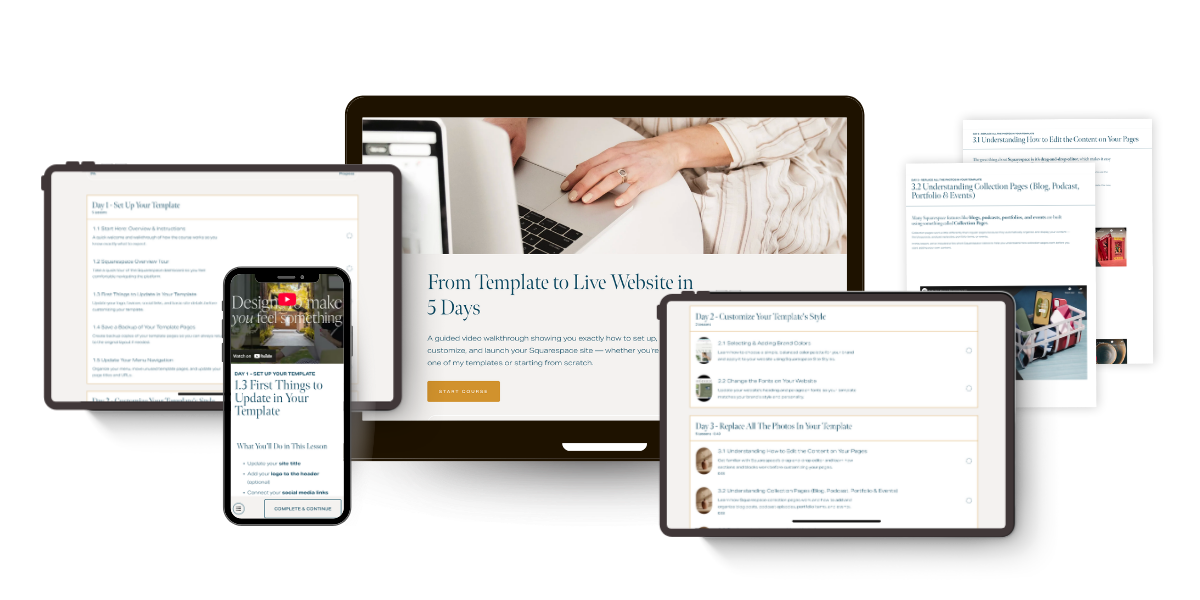
Template to Launch is a guided, day-by-day course that walks you through exactly how to set up, customize, and publish your Squarespace site — whether you're using one of our templates or starting from scratch.
A designer would charge $2,000+ for this. Template to Launch does it for $97 — and puts you in the driver's seat.
WHAT’S INSIDE TEMPLATE TO LAUNCH
Everything you need to customize your template and launch a website that attracts the right clients — without hiring a designer for thousands.
All for $97
Get Your Foundation Right
Logo, navigation, SEO basics, and a backed-up layout — set up correctly from the start so nothing breaks when you start customizing.
Add Your Content & Copy
Replace every placeholder with your real words, photos, and offers — plus a copywriting crash course so your CTAs actually convert.
Make It Look Like Your Brand
Colors, fonts, layout. We'll get your site looking custom-designed instead of straight off a template shelf.
Launch It Like You Mean It
Mobile optimization, domain connection, traffic strategy, and personalized feedback before you go live.
It’s Time To Turn Your Half-Finished Template Into A Real Website
Instead of guessing, breaking your design, or drowning in tutorials — you'll follow a clear, step-by-step process to customize your template and launch a site that actually looks like your business.
MEET YOUR INSTRUCTOR

Here's something nobody talks about: a half-finished website isn't just an aesthetic problem. It's a revenue problem.
When someone lands on a site that looks half-baked, outdated, or like a template demo, they assume the business behind it is the same. Meanwhile someone less experienced — but better packaged — gets the client.
Infuriating. Also very human.
I've built websites for small businesses for years and studied digital marketing at Harvard Business School — so I know exactly why some businesses get the client... and others get ignored.
That's why I created this course: to help you turn your Squarespace template into a website that actually reflects the quality of your work — and turns visitors into paying clients.

By The End Of This Course, YOU’LL HAVE:
NO. 1
A Fully Customized Website
Your Squarespace template won’t look like the demo anymore. It’ll look like your business — your photos, your content, your brand.
NO. 3
The Confidence to Actually Use It
After this course you'll know your site well enough to swap photos, update copy, or add new pages yourself — without breaking anything or calling a developer.
NO. 2
A Website You’re Proud To Share
No more cringing when someone asks for your URL. You’ll finally have a site that reflects the quality of your work.
NO. 4
A Live Website That’s Ready For Clients
Your site will be published, connected to your domain, and ready to send clients to.

WHAT’S INSIDE
Five days of lessons. A website at the end.
Follow the five-day structure or move at your own pace — the lessons are yours to keep and revisit anytime.
-
Start your site the right way so you don’t break anything later.
Overview + walkthrough of the Squarespace dashboard
Complete the basic setup of your template
Create a backup of your template layout
Clean up and organize your site navigation
-
Turn the template into something that actually looks like your brand.
Add your brand colors
Update fonts and styling
Make the design feel cohesive instead of “template-y”
-
Learn how to replace demo content without wrecking the layout.
Understand how Squarespace pages and content blocks work
Replace all the demo photos with your own
Edit key sections like your footer
Template-specific walkthroughs and fixes
-
Swap out the placeholder text and turn your site into a real business tool.
Quick copywriting crash course
Replace template text and calls-to-action
Set up your contact forms
Add booking forms or appointment scheduling
Edit your announcement bar
Basic SEO setup to help people find your site
Grow your email list with your website
-
If you want to sell directly on your website.
Collect payments for services
Build and sell your own course on Squarespace
Set up a shop and sell products
-
The final steps to get your site live.
Adjust your site for mobile
Connect your domain
Publish your website
Get personalized feedback on your site
Learn how to start driving traffic
Frequently Asked Questions
-
No. The course teaches the core parts of Squarespace that apply across templates, so you can follow along with almost any template. I’ll also point out where things may look slightly different depending on your design.
-
Not at all. If you can log into Squarespace and click around a website editor, you can do this. The lessons walk you through everything step-by-step.
-
The lessons are organized into a simple five-day structure, but the course is completely self-paced. Some people launch their site in a day, others follow the full five days or move through it more slowly.
-
Perfect — you can jump in wherever you are. The lessons will help you clean things up, replace remaining template content, and get your site ready to launch.
-
That’s totally fine. The five days are simply a structure to help you move forward quickly. You’ll have access to the course so you can revisit the lessons anytime.
-
Yes. There’s an optional section that walks through setting up payments, selling services, building a course, or adding a shop to your site.
-
Due to the digital nature of the course and immediate access to the content, purchases are non-refundable. If you have questions about whether the course is right for you, feel free to reach out before purchasing.
-
You get ongoing access to the course, so you can return to the lessons whenever you need a refresher or want to make updates to your site.
YOUR WEBSITE ISN’T GOING TO BUILD ITSELF
LET’S FINISH What You Started
You already bought the template.
This course shows you exactly how to customize it and get your website live.
Follow the steps. Replace the demo content. Launch your site.